Post / on X (Twitter)Share / on FacebookShare / link on WhatsApp
XML crawl manifest listing every public route MW4 cheat tiers — Lite, Pro, and Elite catalog grid (single hub link) Chronological writeups on loaders, patches, and tuning Mock forum shell showing example discussion titles only Answers on key resets, chargebacks, and hardware IDs Brief same-origin redirect before hosted payment form Scope note: multiplayer overlay documentation only How analytics tags behave and how support mail is stored Contract text covering digital goods and dispute windows Mailbox path for stuck injections or order receipts Stream-recording hygiene: mask capture without leaking HUD Visual-first build compared with aim-assist add-ons explained Wide radar sweep paired with extraction-mode loot highlights Single destination for every module class on the top build Corner boxes, skeleton draw, snapline distance ceilings Crosshair gate delay plus arming key for burst sprays Cosmetic swaps and account-side extras in one index
PC · Modern Warfare

COD MW4 MW4 cheats for PC — aimbot, player ESP & wallhack

Lite, Pro, and Elite tiers for Multiplayer and DMZ on Windows—stream-proof options, patch-day updates, and secure access. Always check loader status before you play.

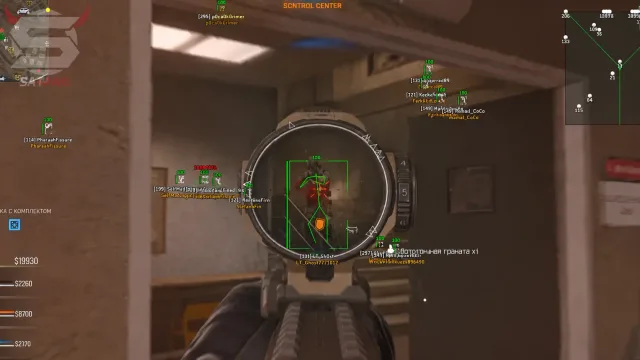
MW4 cheat overlay preview on PC

Yes

Stream-proof

Fast

Patch focus

2 profiles

Configs

Email

Support

ESP Active
Radar Online
PC build
Status gate
Smooth aim
No Recoil
Stream Proof
Loot ESP
Skeleton ESP
2D Radar
Wall check
Support
Portal delivery
Readable HUD
Trigger Bot
Bone Select
Live Status
Auto Updates
Windows 10 & 11
MW4 PC client
Administrator install
Auto updater
Config sync
Email support
Utility add-ons
External loader
ESP Active
Radar Online
PC build
Status gate
Smooth aim
No Recoil
Stream Proof
Loot ESP
Skeleton ESP
2D Radar
Wall check
Support
Portal delivery
Readable HUD
Trigger Bot
Bone Select
Live Status
Auto Updates
Windows 10 & 11
MW4 PC client
Administrator install
Auto updater
Config sync
Email support
Utility add-ons
External loader

Features

Aim, visuals, radar, DMZ

Module groups line up with how you actually play—6v6 clarity versus DMZ sweep routes.

Aimbot

Smooth, not snappy.

Aim circle around the crosshair with smooth acquisition onto operators. Pick head, upper chest, or closest; respect walls; cap distance; skip teammates and downed players. Optional circle draw while tuning.

  • Configurable aim circle and smooth strength
  • Head / chest / closest target selection
  • Wall check and distance cap
  • Skip friendlies and downed operators

Triggerbot

Fire when lined up.

Fires when your crosshair is on an enemy with a short delay; head or chest; same visibility rules as aim. Hold key to arm so sprays stay intentional.

  • Crosshair gate + short delay
  • Bone choice matches aim rules
  • Hold key for controlled bursts

Player ESP

Read the fight.

Box or corner box, skeleton, health, armor, distance, optional name, weapon, snapline. Quieter color when someone is behind cover; squad color; caps so 6v6 stays legible.

  • Box styles and skeleton
  • Health / armor / distance
  • Name off by default
  • Distance cap for clutter

Radar

Macro awareness.

2D radar with operator markers plus range and zoom so you can widen or tighten the picture.

  • 2D layout
  • Operator markers
  • Range + zoom controls

DMZ Loot

Hajin routes without HUD spam.

Cash and bags, armor and ammo, contracts, extract points, and vehicles on farmland roads. Keeps that layer off when you are grinding 6v6.

  • Cash / bag highlights
  • Contracts & extract points
  • Vehicles on roads
  • Stays off in MP

Misc & QoL

Shooting and capture hygiene.

No recoil, no spread, stream-proof overlay, and a custom crosshair so feeds stay clean for creators.

  • No recoil / no spread toggles
  • Stream-proof capture path
  • Custom crosshair

Profiles & configs

One for 6v6, one for DMZ.

Save separate profiles so fast-paced modes stay minimal while DMZ enables loot and vehicles without re-tuning everything mid-session.

  • Dedicated 6v6 vs DMZ presets
  • Quick swap before queue
  • Cloud backup in portal

Patch delivery

Check status first.

Portal builds track COD updates and anti-cheat changes—read the banner before you launch after patch day.

  • Status banner on site
  • Loader sync with portal
  • Conservative defaults after patches

Products

COD MW4 products

Core tiers plus utilities for account workflows and cosmetics.

Why us

Clear tiers—not mystery bundles

We publish what each tier enables and where it shines (6v6 vs DMZ). Skip layers you do not need so the HUD stays usable.

  • Status before launch

    Check the homepage banner whenever COD or anti-cheat updates land—do not queue blind.

    COD Cheats
    Typical provider
  • Mode-aware presets

    Separate profiles for sweat 6v6 and slow DMZ rotations so loot/radar noise stays out of small maps.

    COD Cheats
    Typical provider
  • Readable overlays

    Distance caps, squad tinting, and quieter behind-cover colors so boxes stay parseable in chaotic fights.

    COD Cheats
    Typical provider
  • Stream-proof path

    Hide overlays from capture software while you keep them on-monitor for play.

    COD Cheats
    Typical provider
  • Utility add-ons

    UGC and Skin changer stacks exist for appeal or cosmetic workflows—documented like the cheat tiers.

    COD Cheats
    Typical provider
  • Straight checkout

    Purchases route through a secure partner flow—no public Discord file drops.

    COD Cheats
    Typical provider

2

Saved profiles

One tuned for Multiplayer, one for Hajin DMZ overlays.

PC

Windows focus

Built around the current MW4 PC client and patch cadence.

24/7

Support window

Staff coverage for setup questions via the Support page.

Setup guide

From checkout to your first match in three simple steps

Unlock the portal, download the loader, import the right preset for your mode, and verify overlays in a private lobby before you queue live.

  1. Complete checkout

  2. Install loader + preset

  3. Verify then queue

How it works

From status check to saved profile

Checkout → loader → private test → live queue with the right preset.

4 steps

  1. 01

    Read status

    Confirm modules are online for the current PC build.

  2. 02

    Pick tier

    Lite, Pro, or Elite—match modules to how you play.

  3. 03

    Install + preset

    Import Multiplayer or DMZ profile before enabling extras.

  4. 04

    Verify overlays

    Private lobby first, then queue with stream-proof already tested.

Blog

Guides and updates

Setup tips, DMZ notes, and patch-day reminders for COD MW4 on PC.

Player overlays on MW4: scale box size, snaplines, and squad colors before the HUD turns to noise—distance caps keep 6v6 callouts readable without clutter on PC.

Stream proof for MW4 cheats: hide capture feeds while overlays stay on your display—OBS checklist so recordings stay clean while player callouts and radar stay off the tape.

Triggerbot delay and hold key for MW4: match timing to sensitivity so sprays stay believable—use a short delay plus hold key gating so bursts stay.

FAQ

Questions about this page

Answers tied to what you are reading—visit the FAQ page for every topic.