
Skin changer
Local preview

At a glance
Key capabilities
What Skin changer focuses on before you open the full module list.
Plus 3 additional modules in the operator portal—see the full list below.
Overview
Local loadout preview
How this build fits ranked, Turbo, and patch-day workflows.
Skin changer / cosmetic preview lets you test looks before you commit—included with Elite in many bundles.
Use for thumbnails or offline planning; live inventory rules still apply online.
Local preview
Cosmetic preview tools show loadouts on your client for content planning—other players see your actual inventory.
Bundling
Included with Elite in many bundles; standalone exists for preview-only workflows without full combat modules.
Modules
What's included
Every module and overlay shipped with Skin changer—toggle and tune in the operator portal.
- Weapon blueprint preview
- Operator skin preview
- Attachment cosmetic view
- Favorites list
- Loadout export
- HUD theme sampling
- Stream capture test mode
Experience
In the client · After you buy
Use the screenshots above for Skin changer—below is what each layer means and how access works after checkout.
In-game layers
- Layer A
Operator sightline
Framed action for testing overlay readability at range.
- Layer B
Mode variety
Use separate presets for fast 6v6 and slower DMZ rotations.
- Layer C
Map flow
Pair visuals with radar and loot layers when the mode calls for it.
Guides
Learn more about Skin changer
Curated articles for setup, tuning, and patch-day checks that match this product.
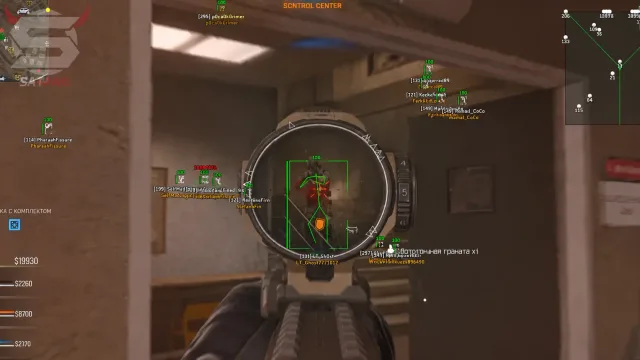
Stream proof for MW4 cheats: hide capture feeds while overlays stay on your display—OBS checklist so recordings stay clean while player callouts and radar stay off the tape.

Every module listed by tier so you know what ships before checkout.
Portal access, order email hygiene, and avoiding fake loader links.
Player overlays on MW4: scale box size, snaplines, and squad colors before the HUD turns to noise—distance caps keep 6v6 callouts readable without clutter on PC.

Triggerbot delay and hold key for MW4: match timing to sensitivity so sprays stay believable—use a short delay plus hold key gating so bursts stay.

ESP-only versus adding smooth aim and trigger modules.
FAQ
Questions about this page
Answers tied to what you are reading—visit the FAQ page for every topic.